
RESEARCH & HPC · JOB ORCHESTRATION
Self-service compute
for every lab.
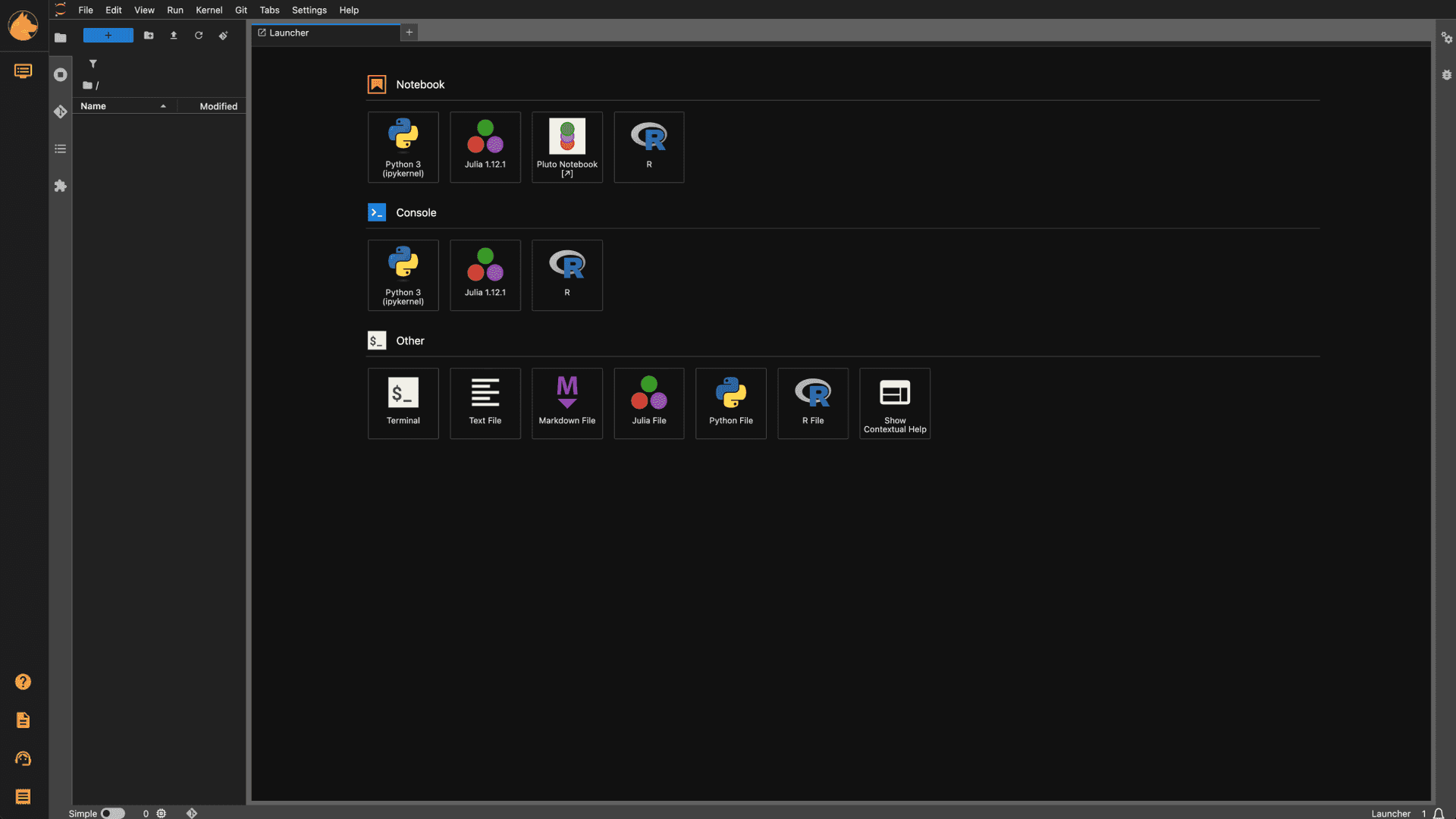
Self-serve GPU workstations, notebooks, and batch jobs on the cluster you already run, with per-lab quotas and campus sign-in.
Why research teams run Orion

Self-serve, not a ticket
Researchers launch Jupyter, a GPU workstation, or a batch job from the catalog, not from a ticket.
Self-serve, not a ticket
Researchers launch Jupyter, a GPU workstation, or a batch job from the catalog, not from a ticket.
Self-serve, not a ticket
Researchers launch Jupyter, a GPU workstation, or a batch job from the catalog, not from a ticket.

One cluster, many labs
A workspace per grant, PI, or course, with quotas that keep every group inside its share.
One cluster, many labs
A workspace per grant, PI, or course, with quotas that keep every group inside its share.
One cluster, many labs
A workspace per grant, PI, or course, with quotas that keep every group inside its share.

Campus identity
LDAP and single sign-on mapped to POSIX on every mount, so files land owned by the right person.
Campus identity
LDAP and single sign-on mapped to POSIX on every mount, so files land owned by the right person.
Campus identity
LDAP and single sign-on mapped to POSIX on every mount, so files land owned by the right person.
From request to running, in the browser.
Researchers pick from the catalog. Admins set up lab workspaces and mounts. Everyone works on the same cluster.
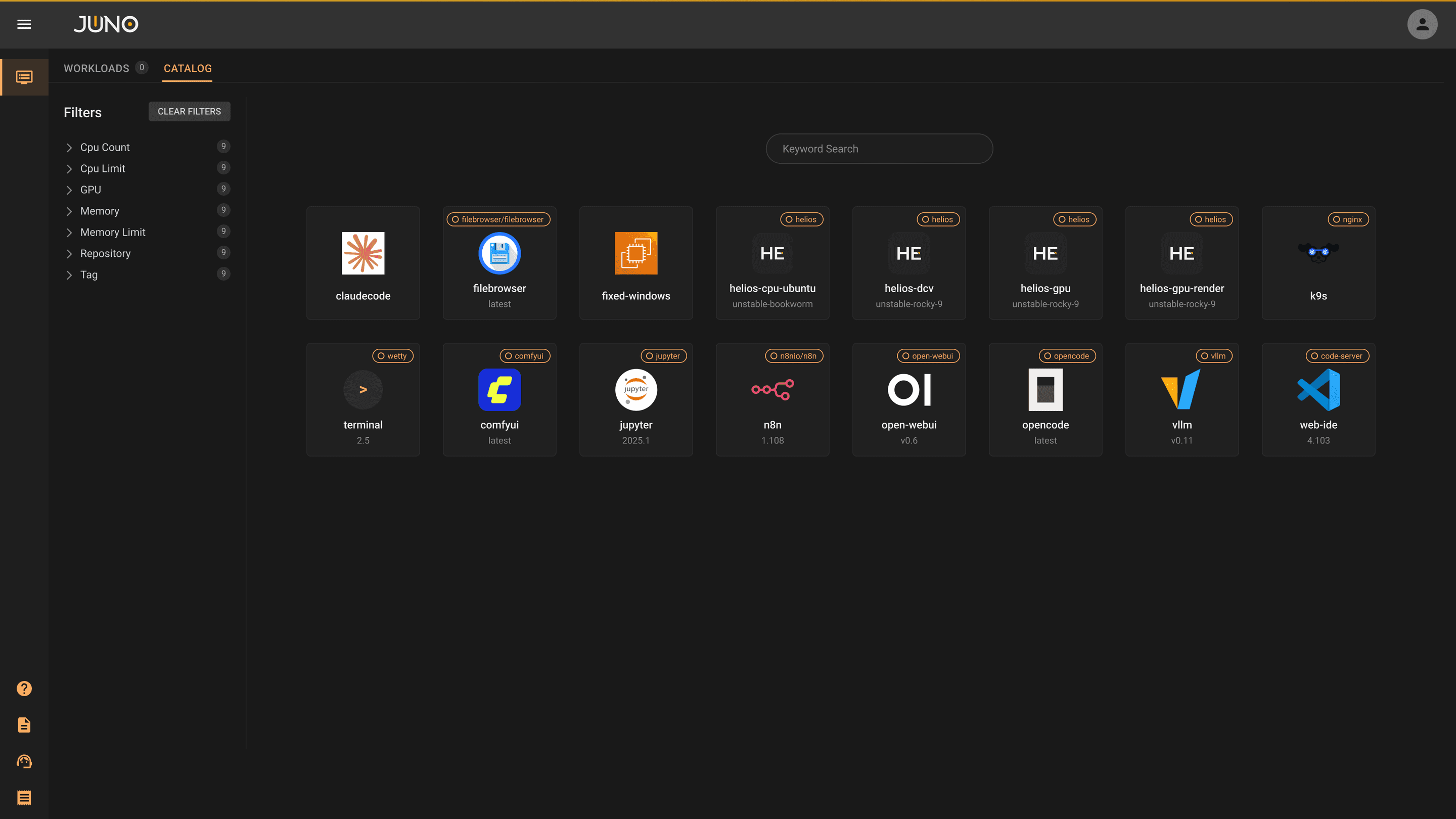


Researchers launch notebooks, desktops, and batch templates their admins set up.
One workspace per lab or course. Hibernate it between semesters.
Every workload lists the lab storage it can reach.
Researchers launch notebooks, desktops, and batch templates their admins set up.
One workspace per lab or course. Hibernate it between semesters.
Every workload lists the lab storage it can reach.
Researchers launch notebooks, desktops, and batch templates their admins set up.
One workspace per lab or course. Hibernate it between semesters.
Every workload lists the lab storage it can reach.

A PATH OFF SLURM
Keep your scheduler while you move.
Orion schedules on Kubernetes, so researchers never learn a new scheduler. A Slurm plugin is available if you run both side by side.
One lab at a time
Move groups over when they’re ready.
Same hardware
Put retired HPC nodes back to work as workers.
GPU slicing
Two to four sessions per card in containers.
60-90s
request to running workload
60%
faster deployment from Orion provisioning · Undersun via Kindwell
Up to 2:1
GPU density from existing hardware, typically
Questions research teams ask
Do researchers need to learn Kubernetes?
+
Do researchers need to learn Kubernetes?
No. They pick a template from the catalog and click Launch. Admins own the templates.
Do researchers need to learn Kubernetes?
+
Do researchers need to learn Kubernetes?
No. They pick a template from the catalog and click Launch. Admins own the templates.
Do researchers need to learn Kubernetes?
+
Do researchers need to learn Kubernetes?
No. They pick a template from the catalog and click Launch. Admins own the templates.
How do students sign in?
+
How do students sign in?
With your campus identity through LDAP or single sign-on. Each user runs as their own POSIX UID and GID.
How do students sign in?
+
How do students sign in?
With your campus identity through LDAP or single sign-on. Each user runs as their own POSIX UID and GID.
How do students sign in?
+
How do students sign in?
With your campus identity through LDAP or single sign-on. Each user runs as their own POSIX UID and GID.
Which GPUs does it support?
+
Which GPUs does it support?
NVIDIA, AMD, and Intel. Time-slicing works for container workloads, and MIG where the hardware supports it.
Which GPUs does it support?
+
Which GPUs does it support?
NVIDIA, AMD, and Intel. Time-slicing works for container workloads, and MIG where the hardware supports it.
Which GPUs does it support?
+
Which GPUs does it support?
NVIDIA, AMD, and Intel. Time-slicing works for container workloads, and MIG where the hardware supports it.
Can we keep Slurm running?
+
Can we keep Slurm running?
Yes. A Slurm plugin is available if you run both side by side, so you can move one lab at a time.
Can we keep Slurm running?
+
Can we keep Slurm running?
Yes. A Slurm plugin is available if you run both side by side, so you can move one lab at a time.
Can we keep Slurm running?
+
Can we keep Slurm running?
Yes. A Slurm plugin is available if you run both side by side, so you can move one lab at a time.
What does the Slurm plugin install?
+
What does the Slurm plugin install?
Slurm itself, as containers on your cluster, through SchedMD’s Slinky operator. You get a controller, compute nodes, and a login node, and the Slurm Terminal plugin opens a browser terminal on that login node.
What does the Slurm plugin install?
+
What does the Slurm plugin install?
Slurm itself, as containers on your cluster, through SchedMD’s Slinky operator. You get a controller, compute nodes, and a login node, and the Slurm Terminal plugin opens a browser terminal on that login node.
What does the Slurm plugin install?
+
What does the Slurm plugin install?
Slurm itself, as containers on your cluster, through SchedMD’s Slinky operator. You get a controller, compute nodes, and a login node, and the Slurm Terminal plugin opens a browser terminal on that login node.
Does Orion take over our existing Slurm cluster?
+
Does Orion take over our existing Slurm cluster?
No. The plugin runs a separate Slurm inside the Orion cluster. Your bare-metal Slurm keeps its batch jobs, and Orion runs the interactive work, such as notebooks, desktops, and services.
Does Orion take over our existing Slurm cluster?
+
Does Orion take over our existing Slurm cluster?
No. The plugin runs a separate Slurm inside the Orion cluster. Your bare-metal Slurm keeps its batch jobs, and Orion runs the interactive work, such as notebooks, desktops, and services.
Does Orion take over our existing Slurm cluster?
+
Does Orion take over our existing Slurm cluster?
No. The plugin runs a separate Slurm inside the Orion cluster. Your bare-metal Slurm keeps its batch jobs, and Orion runs the interactive work, such as notebooks, desktops, and services.
Do users sign in to Slurm with their Orion login?
+
Do users sign in to Slurm with their Orion login?
Not yet. The Slurm login node signs users in through your directory with SSSD, separately from Orion Workspace.
Do users sign in to Slurm with their Orion login?
+
Do users sign in to Slurm with their Orion login?
Not yet. The Slurm login node signs users in through your directory with SSSD, separately from Orion Workspace.
Do users sign in to Slurm with their Orion login?
+
Do users sign in to Slurm with their Orion login?
Not yet. The Slurm login node signs users in through your directory with SSSD, separately from Orion Workspace.
How is Orion different from Open OnDemand?
+
How is Orion different from Open OnDemand?
Open OnDemand is a web portal for HPC resources, with file access, shells, job submission and interactive apps such as desktops and notebooks. Each app it offers has to be written for it. In Orion, an admin installs apps as plugins from Orion Apps in the browser, and your team can add its own applications by writing a deployment YAML file. Orion also runs the compute underneath. It schedules workloads across your nodes, shares GPUs between them and runs virtual machines next to containers. You can keep Open OnDemand for Slurm users and run Orion beside it.
How is Orion different from Open OnDemand?
+
How is Orion different from Open OnDemand?
Open OnDemand is a web portal for HPC resources, with file access, shells, job submission and interactive apps such as desktops and notebooks. Each app it offers has to be written for it. In Orion, an admin installs apps as plugins from Orion Apps in the browser, and your team can add its own applications by writing a deployment YAML file. Orion also runs the compute underneath. It schedules workloads across your nodes, shares GPUs between them and runs virtual machines next to containers. You can keep Open OnDemand for Slurm users and run Orion beside it.
How is Orion different from Open OnDemand?
+
How is Orion different from Open OnDemand?
Open OnDemand is a web portal for HPC resources, with file access, shells, job submission and interactive apps such as desktops and notebooks. Each app it offers has to be written for it. In Orion, an admin installs apps as plugins from Orion Apps in the browser, and your team can add its own applications by writing a deployment YAML file. Orion also runs the compute underneath. It schedules workloads across your nodes, shares GPUs between them and runs virtual machines next to containers. You can keep Open OnDemand for Slurm users and run Orion beside it.
Buying for a university or research lab? Cambridge Computer is our closest channel partner for research universities and labs.
More on research computing.
Posts filed under HPC, newest first.


KEEP GOING

Give every lab its own workspace.
Book a 30-minute demo with an engineer, or install Community Edition and read the docs.
Give every lab its own workspace.
Book a 30-minute demo with an engineer, or install Community Edition and read the docs.
Give every lab its own workspace.
Book a 30-minute demo with an engineer, or install Community Edition and read the docs.