New

Orion 4.8 · log viewer, workload locking →

One compute plane.
Every workload, running.

One compute plane.
Every workload, running.

You have the compute, yet enterprise on-premises GPU utilization sits at 10 to 15%. Orion turns your compute into workstations, VMs, GPU jobs, and apps your team launches in about 60 seconds. Bare metal or cloud, x86 or ARM, on hardware you already own.

bash
$curl -sL "$(curl -s https://api.github.com/repos/juno-fx/Juno-Bootstrap/releases/latest | grep browser_download_url | grep orion-install-helper | cut -d '"' -f 4)" | bash -# Then pick “On Prem K3s” in the form and follow the prompts.
Air-gapped? Follow the offline install guide →

Install in one command · Customer-hosted · No purchase order to start

Orion Admin×
+
←→↻
admin.your-domain.com/workspaces☆
⋮
Orion Admin workspaces list with status, health and actions per workspace
Orion Admin×
+
←→↻
admin.your-domain.com/workspaces☆
⋮
Orion Admin workspaces list with status, health and actions per workspace
Orion Admin×
+
←→↻
admin.your-domain.com/workspaces☆
⋮
Orion Admin workspaces list with status, health and actions per workspace

Get from install to launch in minutes.

Admins set Orion up once, in four steps. Everyone else starts at step five, from a browser.

Admins · once
Everyone · every day
Admins · once
bash
$ curl -sL "$(curl -s https://api.github.com/repos/juno-fx/Juno-Bootstrap/releases/latest | grep browser_download_url | grep orion-install-helper | cut -d '"' -f 4)" | bash -
01
Install Orion
Run one command on a Linux server. It sets up the cluster and Orion together.
Ready in minutes
Orion Admin node list: host, roles and health for every node
02
Connect your nodes
Add machines from the Networking page. Orion installs what they need and joins them.
Minutes per node
Orion Admin users table with Create user and Import users
03
Add your people
Connect sign-in, set roles, and map each user to their POSIX account.
Once per team
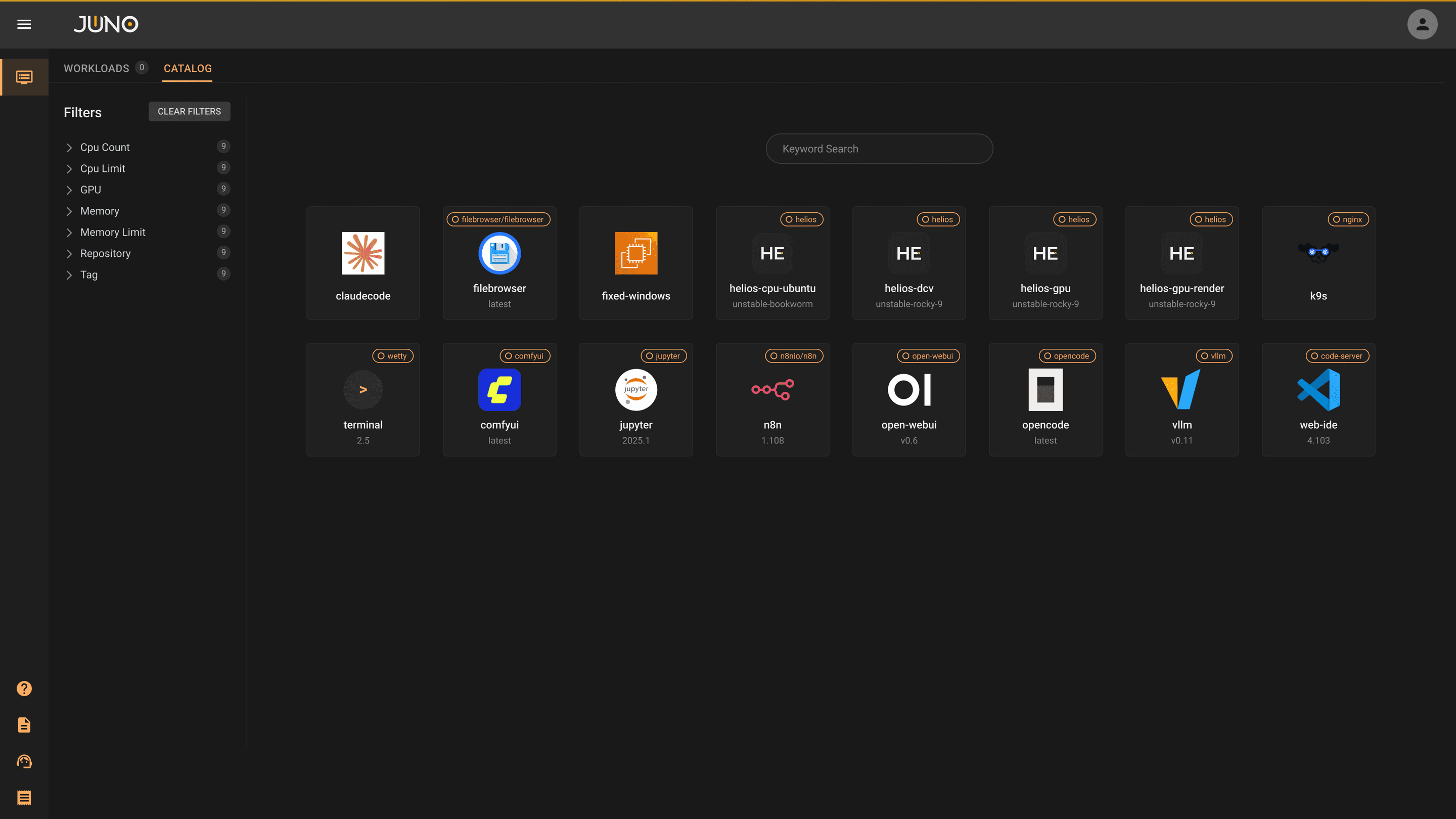
Orion Apps store tiles: Certificate Manager, Claude Code, ComfyUI, Firefox, Generic Ephemeral VM, Gitea
04
Install apps
Pick plugins from the Orion Apps store and install each one from a form.
One form per app
Everyone · every day
Orion Workspace home: workloads with CONNECT buttons and a Windows VM at 7 of 10
05
Launch a workspace
Anyone on the team picks a template and presses Create. The session opens in the browser.
About 60 seconds
Full install guide in the docs →Customer-hosted. Runs on bare metal, hypervisors, or cloud VMs, x86 or ARM.
Admins · once
Everyone · every day
Admins · once
bash
$ curl -sL "$(curl -s https://api.github.com/repos/juno-fx/Juno-Bootstrap/releases/latest | grep browser_download_url | grep orion-install-helper | cut -d '"' -f 4)" | bash -
01
Install Orion
Run one command on a Linux server. It sets up the cluster and Orion together.
Ready in minutes
Orion Admin node list: host, roles and health for every node
02
Connect your nodes
Add machines from the Networking page. Orion installs what they need and joins them.
Minutes per node
Orion Admin users table with Create user and Import users
03
Add your people
Connect sign-in, set roles, and map each user to their POSIX account.
Once per team
Orion Apps store tiles: Certificate Manager, Claude Code, ComfyUI, Firefox, Generic Ephemeral VM, Gitea
04
Install apps
Pick plugins from the Orion Apps store and install each one from a form.
One form per app
Everyone · every day
Orion Workspace home: workloads with CONNECT buttons and a Windows VM at 7 of 10
05
Launch a workspace
Anyone on the team picks a template and presses Create. The session opens in the browser.
About 60 seconds
Full install guide in the docs →Customer-hosted. Runs on bare metal, hypervisors, or cloud VMs, x86 or ARM.

Running with teams and partners like

Three products.
One plane.

Admins set it up once. Users launch what they need.

Apps install from Git. All on the same cluster, under the same identity.

Orion Admin

For the people who run the cluster.

Workspaces, nodes, mounts, networking, users, and quotas in one place.

Orion Workspace

For everyone who does the work.

Orion Apps

For the tools you already use.

Orion Admin

×

+

←

→

↻

admin.your-domain.com/workspaces

☆

⋮

Orion Admin workspaces list with status, health and actions per workspace

Orion Workspace

×

+

←

→

↻

orion.your-domain.com/workloads

☆

⋮

Orion Workspace table of running workloads with Connect buttons

Orion Apps

×

+

←

→

↻

admin.your-domain.com/apps

☆

⋮

Orion Apps store with app templates and category filters
Orion Admin

For the people who run the cluster.

Workspaces, nodes, mounts, networking, users, and quotas in one place.

Orion Workspace

For everyone who does the work.

A catalog of workstations, notebooks, VMs, and agents. Click Launch and get a session in about 60 seconds.

Orion Apps

For the tools you already use.

An app store of plugins, powered by Terra and installed from a form. 50+ official plugins, plus your own repos.

Orion Admin

×

+

←

→

↻

admin.your-domain.com/workspaces

☆

⋮

Orion Admin workspaces list with status, health and actions per workspace

Orion Workspace

×

+

←

→

↻

orion.your-domain.com/workloads

☆

⋮

Orion Workspace table of running workloads with Connect buttons

Orion Apps

×

+

←

→

↻

admin.your-domain.com/apps

☆

⋮

Orion Apps store with app templates and category filters

HOW IT FITS

HOW IT FITS

Orion connects your people to the machines you already have.

“

Being able to treat our own internal cluster like a mini-cloud and platform for users is a game changer.

Donald Strubler

Head of Technology, R3D Studios, 2025

Same day

Provisioning, down from 5 to 8 days

<4 min

To provision an environment, down from 2 to 3 days · Undersun via Kindwell

Run it on your own cluster this week.

Book a 30-minute demo with an engineer, or install Community Edition and read the docs.

Run it on your own cluster this week.

Book a 30-minute demo with an engineer, or install Community Edition and read the docs.

Run it on your own cluster this week.

Book a 30-minute demo with an engineer, or install Community Edition and read the docs.