The DGX Spark is a seriously impressive box. It has 128GB of unified CPU and GPU memory on a single die, and a GB10 Grace Blackwell chip that handles models which would need several server-class GPUs on a traditional setup. And it sits on a desk.
In most deployments we have seen, it sits on one person’s desk and does one person’s work.
The hardware can serve a whole team at once, so the hardware is not what holds it back. Linux is. Getting a Spark set up properly for a real AI workload takes command-line skills that most researchers, developers, and creative people do not have and should not need. So the Spark turns into a personal workstation by default, because sharing it takes too much setup.
That problem has a fix. Here is what we built and what changed.
What the Linux barrier looks like
When someone new unboxes a DGX Spark, here is the list in front of them. They configure network settings from the command line, install the CUDA toolkit and the NVIDIA container runtime, pull and configure container images for their workload, set up storage paths and mount points, manage environment variables for each application, and sort out conflicts when two workloads want different library versions.
Every one of those steps has documentation. The documentation assumes you already know Linux. For example, a researcher who wants to run AlphaFold on a Spark to look at protein structures should not have to learn the difference between a volume mount and a bind mount first.
So the Spark gets used by the one person on the team who is comfortable in a terminal, usually at a fraction of what it can do, and everyone else works around the hardware instead of on it.
What changes with a browser
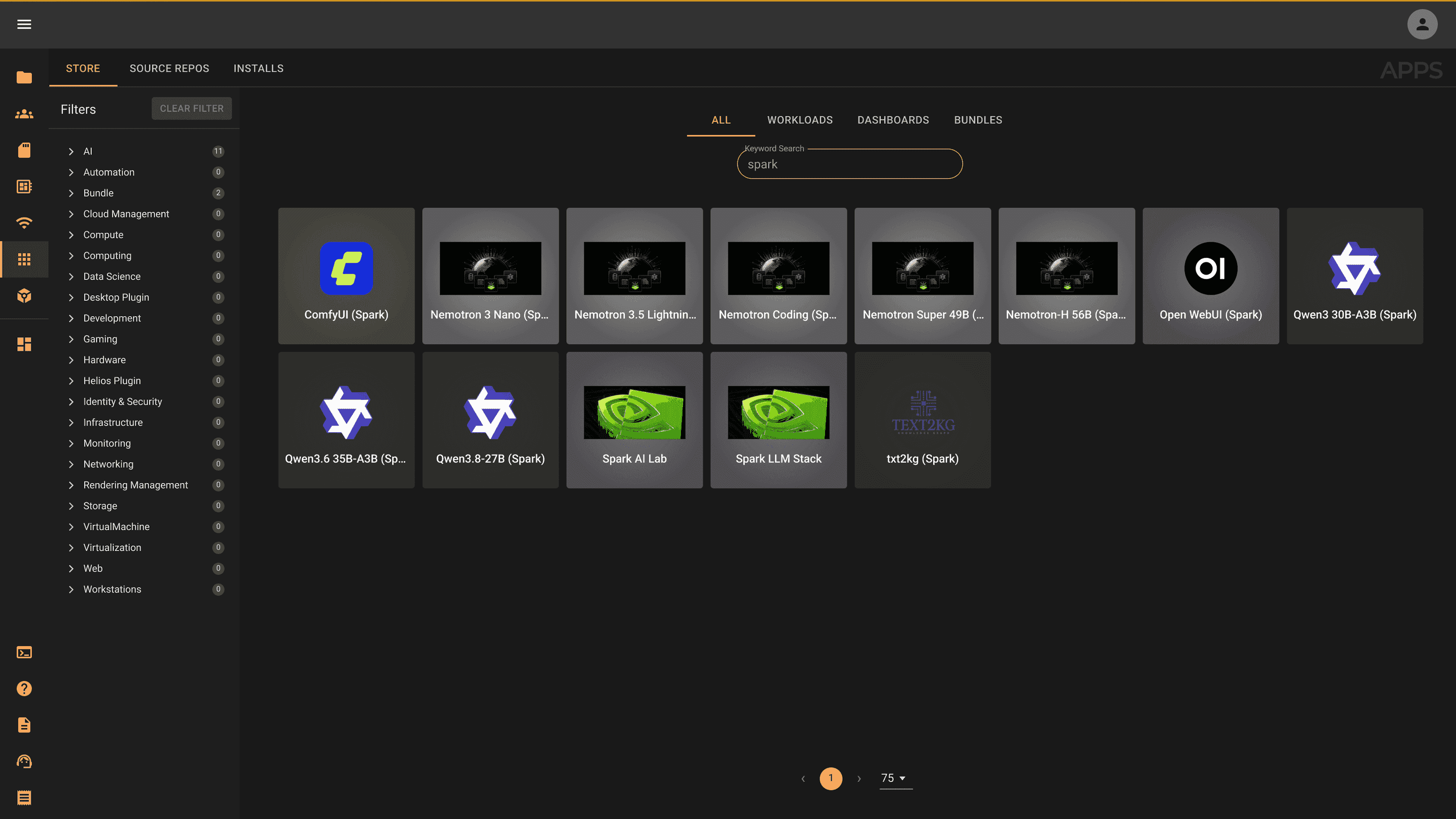
Orion runs on the Spark and shows a catalog of workloads in a browser. You open the URL, log in, and see cards for the applications you have access to: Jupyter notebook, VS Code IDE, Open WebUI and Ollama for local models, and any custom research environments your IT admin has set up.
You click a card. The workload launches in about sixty seconds and you get a full-screen browser interface to the application. When you are done, you close it and the resources go back to the pool.
You never touch a command line or configure an environment, and workloads do not fight each other, because each one runs in its own isolated container with its own dependencies. It feels closer to opening a web app than to running a Linux server. If you have ever spent a night SSHed into a production box trying to work out what changed, that difference is a big deal.
The Spark’s 128GB of unified memory becomes a shared pool instead of a fixed allocation for one workload. Several people can have workloads running at the same time. The scheduler places each workload on available resources and enforces the limits set in its template. No single workload can take the whole device unless an administrator sets it up that way.
When one Spark is not enough
When a team outgrows a single Spark, Orion clusters several of them into one unified compute plane. A second Spark joins the cluster in minutes. The catalog stays the same and workloads schedule across both devices. Users never see the cluster layout. They just see their workloads running.
The same goes for mixed hardware. A Spark next to older workstations, Intel NUC nodes, or cloud instances all shows up as one pool the scheduler can use. A workload that needs the Spark’s Blackwell GPU lands there. A workload that only needs CPU and memory can land on any node with room. The scheduler handles placement and the user clicks a card.
For teams where people or departments own their own Sparks, Orion can federate them into a shared pool. A researcher’s Spark is their personal device during working hours. When they are not using it, the compute joins the institution’s pool and other people can use that capacity. When the researcher comes back, their own workloads get priority on their device.
Running the model locally
The Spark’s unified memory makes it practical to run large language models locally. We run a 35-billion parameter model on a single Spark with a 262,144-token context window, serving several users and agents at once through a standard API.
For a team doing AI-assisted development, analysis, or creative work, that means a capable AI assistant for everyone, with no per-request bill and no data leaving the infrastructure. The model runs on the Spark. The requests come from workloads on the same cluster. Nothing outside is involved.
For teams with data governance rules, this matters in a very practical way. Research data, proprietary code, and sensitive documents never have to leave the Spark to get AI help. The inference is local, so the data stays local.
What this looks like for different teams
For a research team, the Spark becomes a shared compute resource where anyone can launch their environment without going through IT. Shared storage with the right file permissions means everyone works on the same data. The local model helps with analysis and writing without the data leaving the institution.
For a development team, the Spark hosts shared dev environments, CI agents, code review automation, and the shared inference endpoint, all on one device. That is a full AI-assisted development setup on hardware that fits under a desk, which is a pretty slick thing to be able to say.
For a creative team, image generation and GPU-accelerated creative tools run as shared workloads. Nobody waits for one person to finish with the hardware before the next person starts. The Spark serves everyone at the same time.
What utilization looks like in practice
A DGX Spark running as a single-user Linux workstation is busy while its owner is working and idle the rest of the time. That means nights, weekends, meetings, and any work that does not need the GPU.
Run the same Spark with Orion, several users, and some automated agent workloads, and that idle time fills up. CI agents run after hours. Automated analysis jobs run overnight. Hardware that was covering one person’s working day now covers the team around the clock.
The cost math is simple. The Spark costs electricity to run. A capable API-based AI service charges per request, every month, and that adds up fast when a team uses it all day. Local inference on a Spark, once you own the hardware, costs electricity. For any team running AI workloads at real scale, the numbers favor local compute.
See how Orion turns a DGX Spark into a team platform. Get a Demo
Anthony Genova is a product engineer at Juno Innovations, building the automation stack and agent frameworks that run on top of Orion.
WRITTEN BY
Anthony Genova
Anthony Genova builds the things that make Orion work. As a product engineer at Juno Innovations, he has spent years writing the automation stack, agent frameworks, and infrastructure tooling that run on top of Kubernetes so researchers, developers, and creative teams do not have to think about what is underneath. Before Juno, he worked across software engineering and systems integration. He writes about agentic systems, workload automation, and the infrastructure patterns that make AI actually useful in production.